PCAP Network Analysis
How to analyze packet captures (.pcap / .pcapng) to find flags in CTF forensics challenges.
PCAP Network Analysis
A .pcap file is a recording of network traffic: every packet sent and received. CTF challenges hide flags in HTTP responses, FTP transfers, DNS queries, ICMP payloads, or encrypted streams that you need to decrypt. Your job is to find them.
Before opening Wireshark, always run strings first. Many flags appear as plaintext in the raw packet data.
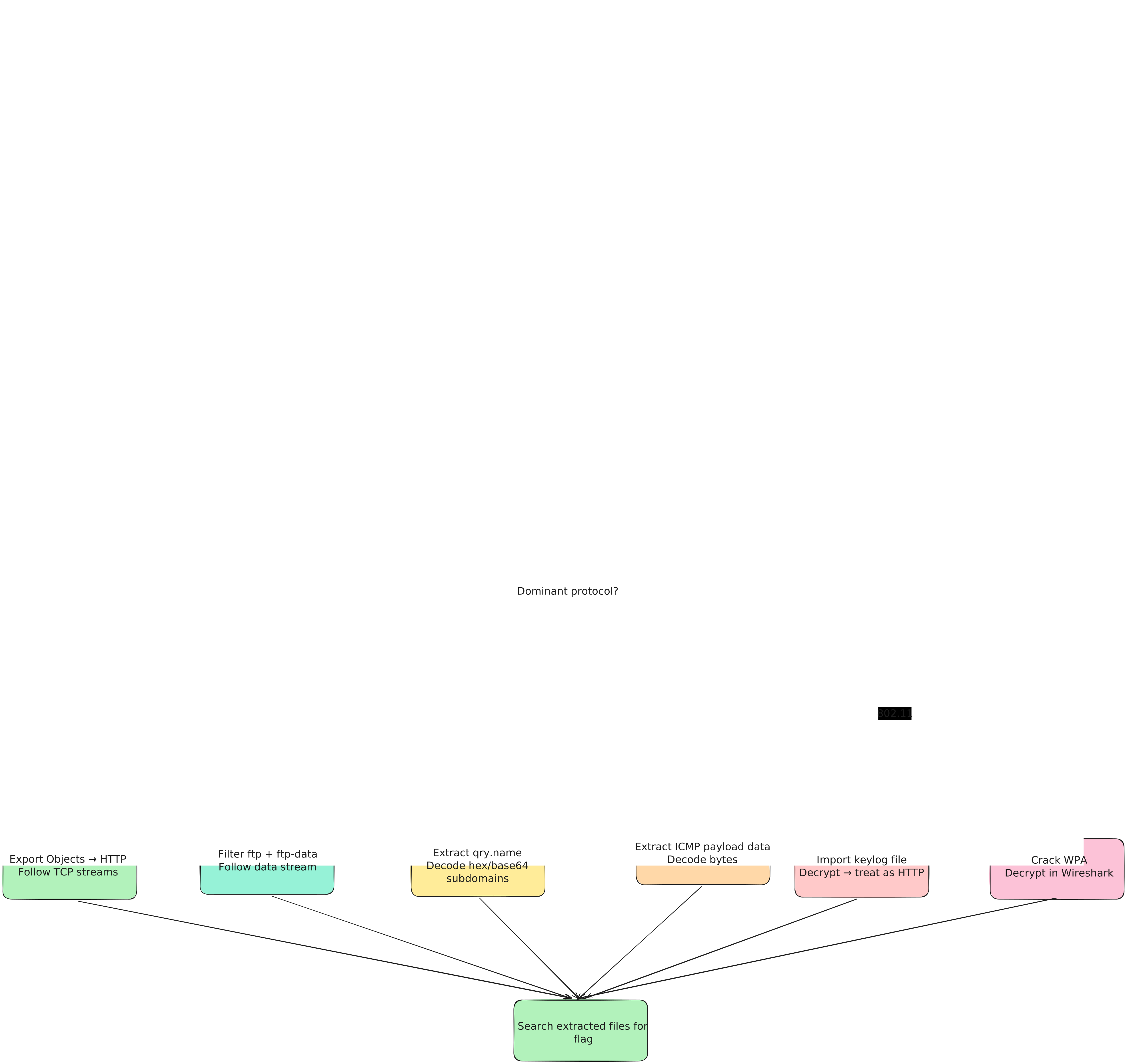
Investigation Flow
Opening the File
# Check file type
file capture.pcap

# Open in Wireshark (GUI, recommended for exploration)
wireshark capture.pcap

# CLI quick analysis
tcpdump -r capture.pcap | head -50
tshark -r capture.pcap | head -50

# Quick string search (fastest possible check)
strings capture.pcap | grep -iE "(flag|ctf|key|pass)\{?"
Investigation Methodology
Get the Big Picture
Before diving into packets, understand what traffic you're dealing with. Go to Statistics → Protocol Hierarchy in Wireshark. This shows you the percentage breakdown of protocols. If 80% is HTTP, focus there. If it's mostly DNS, look for exfiltration.
| Menu | What it shows |
|---|---|
| Statistics → Protocol Hierarchy | Percentage of HTTP, DNS, TCP, etc. |
| Statistics → Conversations | Which hosts talked; how many bytes |
| Statistics → Endpoints | All IP addresses and ports seen |
Apply Display Filters
Narrow down to the protocol of interest using the Wireshark filter bar or tshark -Y.
Follow Streams
Right-click any packet → Follow → TCP Stream to reconstruct the full conversation between two hosts. This is the single most useful feature for CTF.
Export Objects
Use File → Export Objects → HTTP to bulk-extract all files transferred over HTTP. The flag is often inside an extracted file.
Decode Covert Channels
Check DNS query names, ICMP payloads, and TCP payload data for encoded flags.
Wireshark Display Filters
Following Streams
Client → Server data appears in red, Server → Client in blue. You'll see full request + response bodies, credentials in plaintext protocols (HTTP Basic, FTP, Telnet, SMTP).
# tshark equivalents
tshark -r capture.pcap -q -z follow,tcp,ascii,0    # stream 0
tshark -r capture.pcap -q -z follow,tcp,ascii,1    # stream 1
tshark -r capture.pcap -q -z follow,http,ascii,0   # HTTP stream
Exporting HTTP Objects
GUI: File → Export Objects → HTTP → (browse list) → Save All
tshark:
tshark -r capture.pcap --export-objects http,./exported_files/
ls ./exported_files/
This extracts HTML pages, images, ZIP files, and executables: anything sent via HTTP.
Extracting Credentials
# Filter: http.authorization
# Value is base64-encoded "username:password"
tshark -r capture.pcap -Y "http.authorization" -T fields -e http.authorization
echo "dXNlcjpwYXNz" | base64 -d   # → user:pass
Covert Channel Analysis
Data encoded in DNS query names is a common steganography technique:
tshark -r capture.pcap -Y "dns.qry.type == 1" -T fields -e dns.qry.name | sort -uLook for suspiciously long subdomains or encoded patterns:
666c6167.attacker.com→ hex for "flag"ZmxhZ3s.attacker.com→ base64 fragmenta.b.c.d.attacker.com→ character-by-character exfiltration
echo "666c6167" | xxd -r -p # → flagtshark One-Liners Reference
Common CTF PCAP Patterns
| Pattern | What to Do |
|---|---|
| HTTP traffic | Export Objects → HTTP; Follow streams |
| FTP session | Filter ftp + ftp-data; follow stream; export objects |
| Credentials in plaintext | Filter for auth protocols; follow TCP streams |
| DNS queries to unusual domain | Extract names; decode hex/base64 |
| ICMP with data | Extract ICMP payloads; decode |
| Long Telnet session | Follow TCP stream; read everything |
| Encrypted (TLS) with key file | Import keylog; decrypt; then treat as HTTP |
| 802.11 wireless | Crack WPA password; decrypt in Wireshark |
Checklist
-
strings capture.pcap | grep -i "flag{"for the fastest check - Statistics → Protocol Hierarchy to understand the traffic
- Follow all TCP streams (especially first few)
- File → Export Objects → HTTP to extract transferred files
- Filter
http.request→ look at all URLs - Filter
ftp+ftp-data→ extract FTP files - Filter
dns→ look for encoded domain names - Filter
icmp→ check ICMP data payloads - Look for credentials:
http.authorization,ftp,telnetstreams - Check for TLS keylog file → decrypt TLS
-
frame contains "flag{"→ direct content search
Practice Resources
- Malware-traffic-analysis.net: real-world PCAPs with exercises
- Wireshark Sample Captures: official protocol samples
Last updated on